



AI Prompt of the month: Creating SOP Flowcharts in ChatGPT

If your company has a set of Standard Operating Procedures (SOP) it can be really helpful to visualize them as flowcharts. Adding such a visual can significantly enhance clarity and efficiency in any SOP.
Essentially, flowcharts serve as visual guides that map out a process step by step, making complex instructions easier to follow. This visual representation is especially beneficial for new employees or anyone needing to understand a procedure quickly, reducing the likelihood of errors. Lucky for us, we can have ChatGPT take an SOP and quickly generate a flowchart for us.
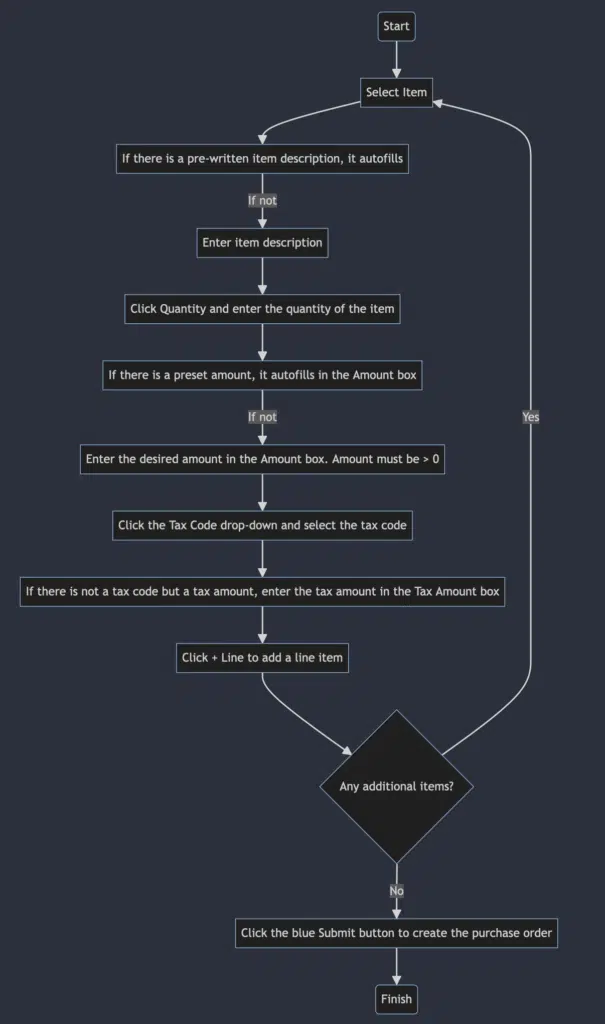
The example below is pulled from our recommended SOP for our PartsManager product. It’s relatively simple, but these flowcharts can be as complicated as your process, and are very likely to make that process even easier to understand.
The Prompt
Can you generate Mermaid code for a flowchart based on the “Adding Items to a Purchase Order” section of the attached PDF? Please avoid using the word “end” as a node name and do not include double quotes inside strings as that is not allowed in Mermaid.
The Result
Based on the “Adding Items to a Purchase Order” section from the PDF, here’s a Mermaid code for a flowchart that illustrates the process:
```mermaid
graph TD;
    A(Start) --> B[Select Item]
    B --> C[If there is a pre-written item description, it autofills]
    C -->|If not| D[Enter item description]
    D --> E[Click Quantity and enter the quantity of the item]
    E --> F[If there is a preset amount, it autofills in the Amount box]
    F -->|If not| G[Enter the desired amount in the Amount box. Amount must be > 0]
    G --> H[Click the Tax Code drop-down and select the tax code]
    H --> I[If there is not a tax code but a tax amount, enter the tax amount in the Tax Amount box]
    I --> J[Click + Line to add a line item]
    J --> K{Any additional items?}
    K -->|Yes| B
    K -->|No| L[Click the blue Submit button to create the purchase order]
    L --> M(Finish)
```
This flowchart starts with selecting an item to add to the purchase order and goes through all the steps such as entering item descriptions, quantities, amounts, tax codes, or tax amounts. It loops back to adding more items if necessary and ends with submitting the purchase order to create it.
The Flowchart:
There are many HVAC and mechanical trade shows vying for your attention and attendance. And we know it would be great to attend them all as these events are so often valuable and invigorating—but we also know that’s not normally possible. Too many shows, too little time, and a limited budget! That’s why we’ve compiled […]
Fire and life safety work doesn’t look the same for every contractor. Some teams focus primarily on recurring inspections and compliance reporting. Others balance inspections with service calls, repairs, and ongoing maintenance across multiple sites and systems. Many fire protection businesses fall somewhere in between—managing a mix of scheduled inspections, emergency service, deficiency tracking, and […]