





Technicians have always done whatever it takes to get the job done, but manual asset entry has never been the part they enjoy. Between faded serial plates, tiny lettering, and tight schedules, capturing equipment details by hand slowed everyone down. And when the data wasn’t complete or accurate, the office was left guessing during quoting, planning, or reporting.
That’s exactly why we are introducing Smart Scan, ServiceTrade’s AI-powered nameplate scanning tool built right into our mobile app. Smart Scan makes it effortless for technicians to capture accurate asset data by simply scanning a nameplate—no typing, no transcription errors, and no wasted time.
Smart Scan uses artificial intelligence to read the make, model, and serial number directly from a nameplate. Technicians can use it in two key ways:
Every scan also helps improve the AI model, making the tool more accurate as customers continue to use it.
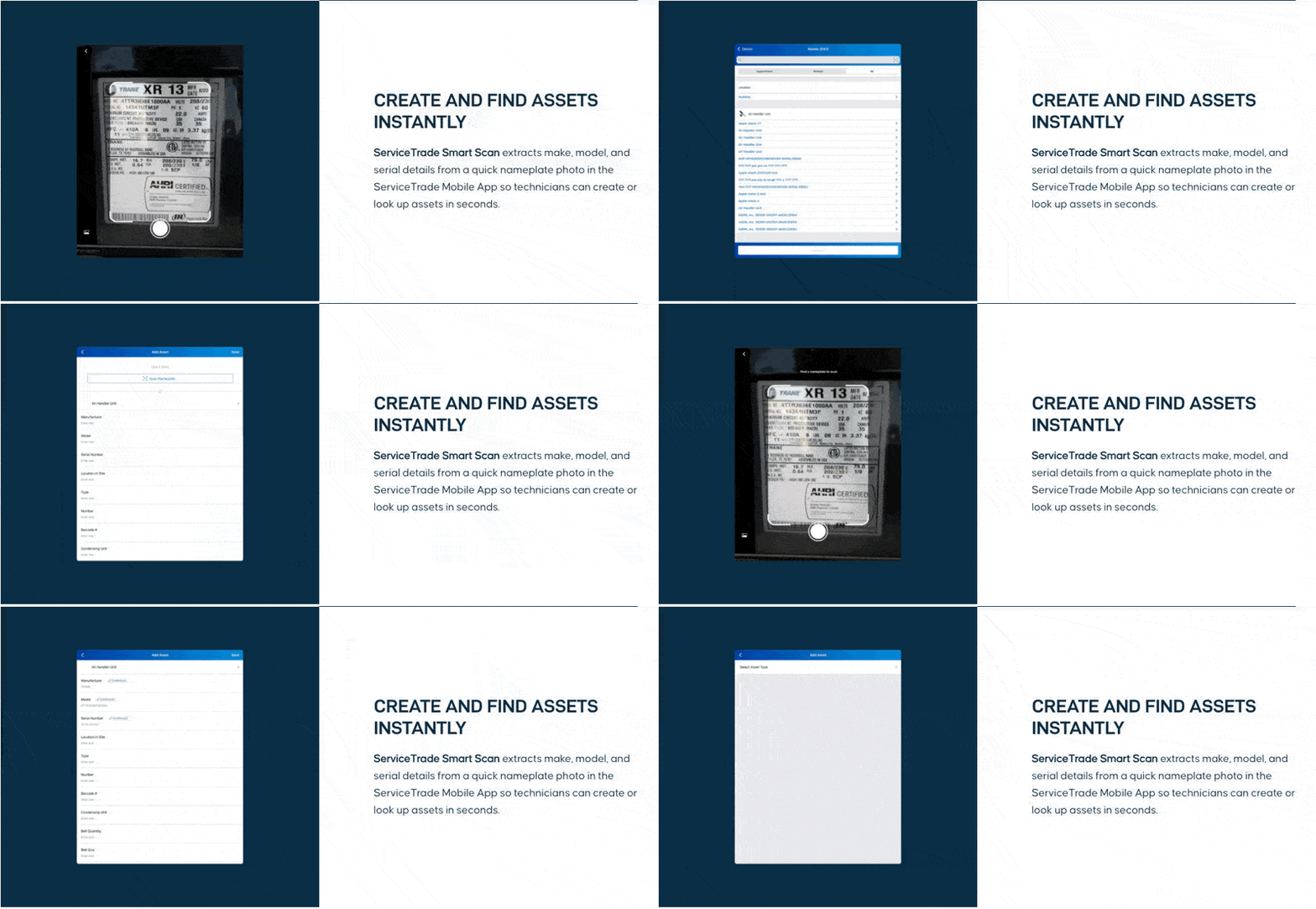
Smart Scan cuts down one of the most repetitive tasks technicians face. Instead of typing long strings of model numbers or snapping photos they’ll organize later, techs can record asset details in seconds. For office teams, Smart Scan ensures the information flowing in from the field is clean and consistent.
Contractors see benefits such as:
It’s a small change that makes a noticeable difference in the speed and quality of work.
Commercial service contractors face intense pressure to deliver more work with the same (or smaller) teams. Removing tedious tasks is one of the easiest ways to increase productivity without adding headcount.
Smart Scan was built to help with exactly that. Accurate asset data is foundational to quoting, preventative maintenance programs, and customer communication but getting it manually was slow and error-prone. Smart Scan ensures techs can collect the data quickly and correctly, all while staying focused on the work that actually drives revenue.
Smart Scan is live in the ServiceTrade Mobile app and available to all Premium and Enterprise ServiceTrade customers. If your technicians haven’t used it yet, make sure they’re running the latest version (7.3.0 for Android and 7.3.1 for iOS) and have them give it a try on their next service call.
Accurate asset data has never been faster, or easier, to capture. When your software works smarter, your whole team does too.
Fire and life safety work doesn’t look the same for every contractor. Some teams focus primarily on recurring inspections and compliance reporting. Others balance inspections with service calls, repairs, and ongoing maintenance across multiple sites and systems. Many fire protection businesses fall somewhere in between—managing a mix of scheduled inspections, emergency service, deficiency tracking, and […]
Mechanical inspections don’t look the same for every contractor. Residential teams need to move fast, stay consistent, and clearly communicate results to customers. Commercial contractors often need more capabilities—like detailed asset tracking, preventative maintenance, and help staying compliant. Many mechanical businesses sit somewhere in the middle, handling a mix of both. The problem? Most inspection […]