








Service invoicing software
Create accurate invoices without chasing job details
ServiceTrade helps commercial service teams capture job details, costs, and approvals in one place so the office can create accurate invoices faster and keep revenue moving.
Trusted by 1,300+ Happy Customers


Faster invoices. Faster cash.
Turn completed work into billable revenue faster
Capture billable details
Collect notes, photos, materials, and approvals from the field in one connected job record
Reduce missed charges
Keep labor, parts, and service details tied to the work order so fewer billable items get overlooked
Invoice work faster
Give the office the information it needs to create accurate invoices that protect margins without chasing paperwork or field updates
From work order to invoice
Keep billing tied to the work your team already completed

Keep invoice details on the work order
ServiceTrade keeps job notes, photos, technician comments, service history, and customer sign-offs organized within the work order, so the office doesn’t have to visit multiple pages to find the information to create an invoice.

Track labor, parts, and materials for billing
ServiceTrade instantly populates billable labor, parts, and materials costs, so your team reviews and adjusts before the invoice goes out.
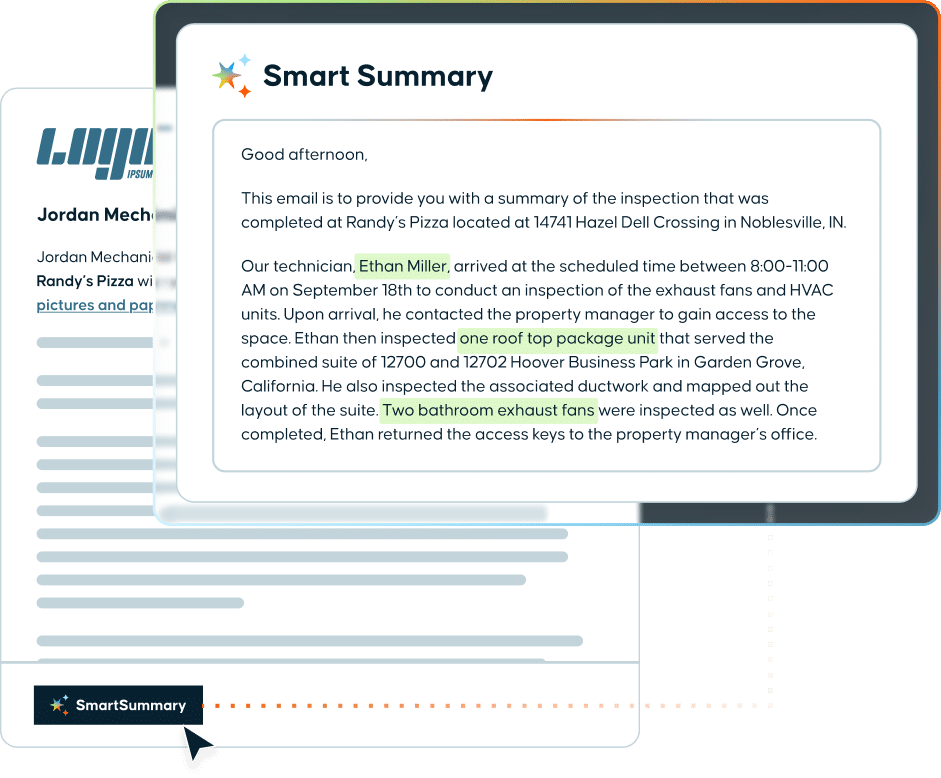
Give customers a clear picture of the job
Customers get a clear, detailed picture of the work behind every invoice. Invoice Link delivers it digitally with a Smart Summary attached, built by office staff in seconds. Fewer calls. Fewer disputes.
Make billing easier on every job
Give your office team the job details they need to create accurate invoices faster — without chasing technicians, paperwork, or missing information.
The Latest
Explore ways to improve billing and cash flow

The job is done. The technician has moved on to the next one. But until the invoice is sent and
The AI-powered prep mode turns contractors’ existing job, asset and service history into job-ready summaries before technicians arrive on site...
Running a successful commercial HVAC service business comes with its own set of challenges. One area that often causes headaches...
ServiceTrade Features
Features that maximize performance
Streamline operations with intelligent scheduling, real-time job status visibility, and automated workflows that accelerate billing cycles, boost customer retention, and drive scalable growth.
Scheduling
Build smarter schedules and keep work moving
Dispatching
Send the right tech with the right details
Quoting
Turn service needs into accurate quotes fast
Invoicing
Get invoices out faster with cleaner job data
Job Management
Manage ever job from start to finish
Sales Management
Quote faster and turn more service agreements into revenue
Parts Management
Track parts, purchasing, and inventory in one place
Inspections
Capture inspection data and turn issues into action
Technician App
Give techs an easy app they’ll actually use in the field
Tech Timecards
Track labor accurately without payroll cleanup
Smart Assistants
Use AI agents to move work forward faster
Integrations
Connect your tools and keep data flowing
FAQs
Looking for more information about invoice software?
What is field service invoicing software?
Field service invoicing software turns completed work into an accurate invoice by keeping job details, technician notes, labor, parts, materials, photos, and customer approvals connected to the work order, instead of scattered across paperwork, texts, and spreadsheets. In ServiceTrade, invoicing lives in the same system used to schedule, dispatch, complete, and review the job, so the office builds every invoice from one connected record instead of piecing it together after the fact.
How does invoicing software work?
Invoicing software collects everything needed to bill for a job: work performed, labor, materials, and contract terms. In ServiceTrade, those details are captured in the field and attached to the work order, so office teams review one complete job record and prepare the invoice without chasing technicians or hunting for paperwork.
What are the key features of invoicing software for commercial contractors?
The most important invoicing software features for commercial contractors include work order details, labor tracking, parts and materials tracking, technician notes, job photos, completed job review, and invoice preparation. Together, these features give the office a complete record of what happened on the job, so invoices go out accurate and fast, with nothing missed.
How does invoicing software reduce errors?
Invoicing software reduces errors by keeping job information in one place, instead of scattered across paper forms, phone calls, texts, spreadsheets, and disconnected systems. When labor, parts, materials, notes, and approvals stay tied to the work order, office teams get one accurate record to review before billing, not five different sources to reconcile.
How can invoicing software reduce missed charges?
Invoicing software reduces missed charges by making billable labor, parts, materials, services, and job details easy to capture and review, in the field and in the office. For commercial service teams, that means full margin capture: less risk that completed work or materials used on a job get left off the invoice.
How can invoicing software improve cash flow?
Invoicing software improves cash flow by helping teams prepare invoices sooner after work is complete. When the office already has the job details, approvals, and billable items it needs, invoices go out faster and payment cycles start sooner. ServiceTrade customers report cutting billing cycle days by 50%.
How can invoicing software reduce billing inquiries?
Invoicing software reduces billing inquiries by putting a well-documented summary of the job, photos, notes, and completed work, in front of the customer through email or a customer portal. When customers can see exactly what they’re paying for, they call the office less and technicians spend less time getting pulled back into questions about past jobs.
How can invoicing improve customer retention?
A clear, itemized summary of completed work, including specifics from the technician who did the job, gives customers confidence that they’re working with a service provider they can trust. That trust is what keeps commercial customers renewing contracts instead of shopping competitors at renewal time.
Field Service Management Software
Ready to invoice with less back-and-forth?
See how ServiceTrade helps your team capture the job details needed to bill accurately and keep cash flow moving.
